
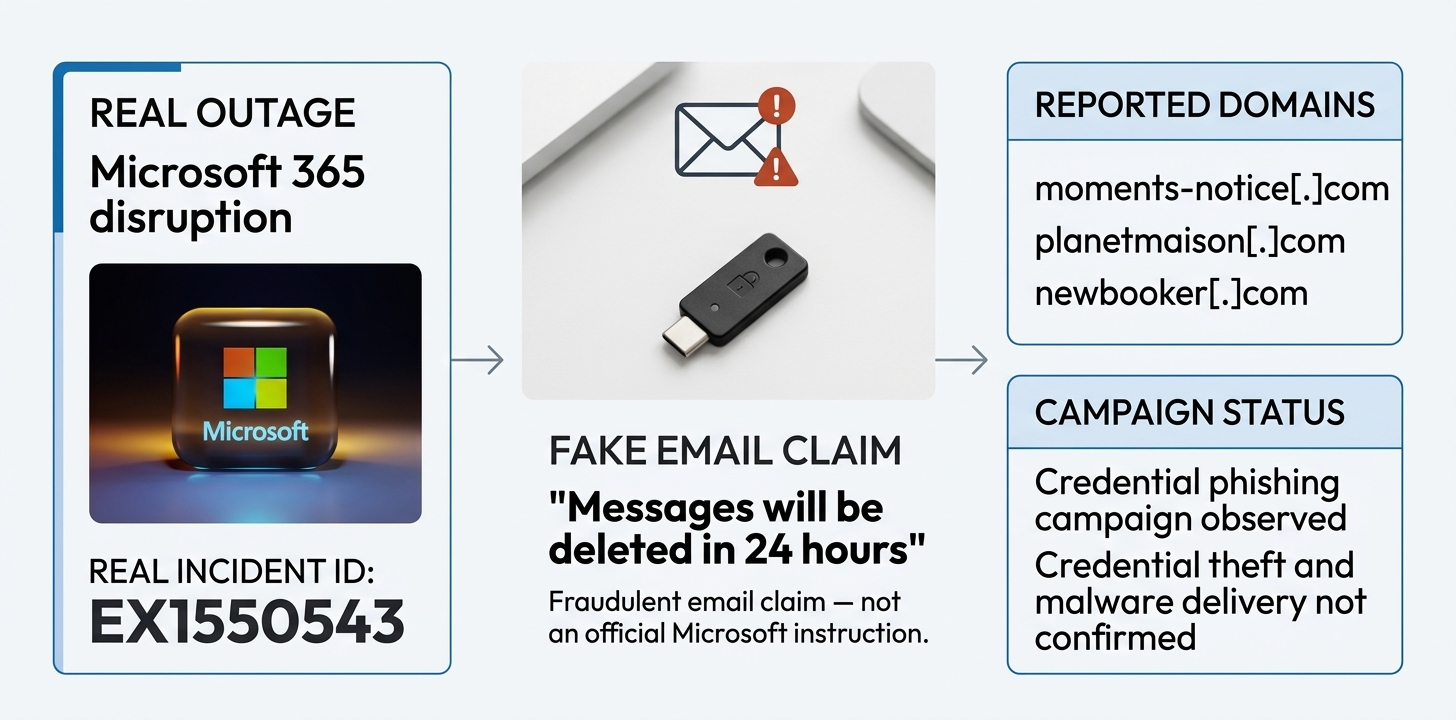
Cybercriminals are exploiting the recent Microsoft 365 outage with fake service-health emails that use the genuine Exchange Online incident reference EX1550543. Microsoft Threat Intelligence has identified an active phishing campaign in which some messages falsely claim that emails delayed during the disruption are being held and will be deleted within 24 hours unless recipients click a link to restore them.
The incident number is genuine, but the restoration claims in these emails are not. The messages impersonate Microsoft 365 service-health notifications and use subject lines following the pattern “Outage – [six-character code]”. Their sender display names include organisation-specific prefixes followed by phrases such as “Outage Notification” or “Service Health”, making them appear relevant to the recipient’s workplace.
The timing makes the deception more convincing. The Exchange Online disruption began on 12 November and affected access to mailboxes through several connection methods, with some email delivery delayed. Microsoft said the outage was caused by a technical issue involving an earlier network capacity upgrade that surfaced after a more recent network change. The company said there was no indication that the disruption was caused by malicious activity. Its updates are available through the official Microsoft 365 service-health page.
Microsoft identified three sender domains associated with the phishing campaign: moments-notice[.]com, planetmaison[.]com and newbooker[.]com. The messages also used recipient-specific SendGrid click-tracking links that redirected to reallifeaccounting[.]com. Microsoft cited /themelist0.html as one example of a destination path.
These are indicators from Microsoft’s investigation, not links users should open. A genuine incident number or familiar-looking sender name does not prove that an email came from Microsoft or an organisation’s IT team.
Microsoft said similar messages had targeted organisations across multiple sectors in the United States. It described the activity as consistent with credential phishing, but has not confirmed whether credentials were collected or malware was delivered. The company has also not published a confirmed victim count or number of compromised accounts for this campaign.
There is a reason some of these messages may look familiar: Microsoft 365 organisations can send genuine quarantine notifications. However, these notifications depend on the organisation’s security policies and are not enabled in every case. Administrators can also customise the sender address and company logo, and choose notification schedules such as every four hours, daily or weekly. Microsoft’s quarantine notification guidance explains how the system works.
Microsoft documents quarantine@messaging.microsoft.com as a possible default sender, but organisations can configure a different address. Users should therefore avoid treating one sender address as a universal test of authenticity. The safer option is to contact workplace IT or open the Microsoft quarantine portal directly, rather than following a link in an unexpected email.
Anyone who receives an outage message asking them to restore held email should avoid clicking its buttons or opening attachments. Outlook users can select Report and then Report phishing if the feature is available. Its availability depends on the organisation’s settings, so workplace users should also follow their employer’s reporting procedure. In the UK, suspicious emails can be forwarded to the National Cyber Security Centre at report@phishing.gov.uk, as explained in its official guidance.
If someone opened a link but did not enter information or download anything, that alone does not mean their account has been compromised. They should close the page and report the email. Anyone who entered a Microsoft password should contact their organisation’s IT or security team promptly and change the password through a trusted route. They should also check for unexpected sign-in activity and unfamiliar multi-factor authentication prompts. Administrators may need to investigate sign-in records, suspicious inbox rules and changes to account security settings, and revoke active sessions where appropriate.
Microsoft’s disclosure confirms targeting across multiple US sectors, but does not establish that UK organisations or personal Outlook.com users were among the targets. The technique is still relevant to anyone using Microsoft services: criminals can exploit a genuine disruption without causing it themselves. The EX1550543 reference makes the fake messages look relevant, but it does not make their sender or restoration request genuine. Anyone checking delayed or quarantined email should use a trusted Microsoft or workplace channel, not an unexpected restoration link.



Community discussion
Join the conversation
0 comments
Be the first to join in
There are no comments yet. Sign in to start a thoughtful discussion.
Sign in to comment
Join the conversation with your Secritic account. Comments are available to signed-in readers.