
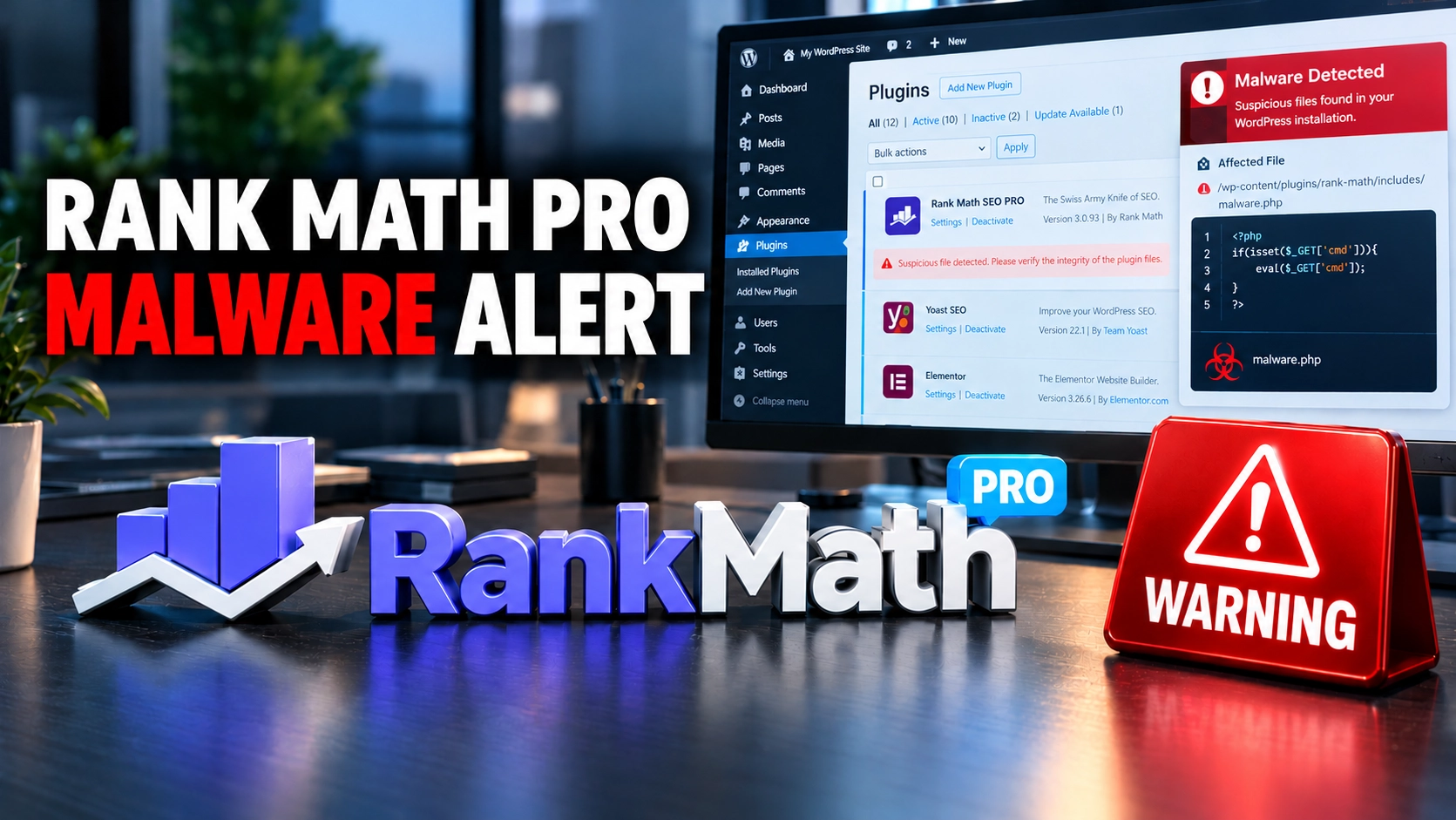
Some downloads of Rank Math SEO PRO version 3.0.123 contained malware during a security incident on 15 and 16 October 2026. According to Rank Math, the affected plugin could compromise a WordPress website if it was activated.
The incident did not affect every Rank Math user. The company says the problem was limited to certain copies of its paid PRO plugin that were downloaded or updated during a specific period. The free Rank Math SEO plugin available through WordPress.org was not affected.
Rank Math has released version 3.0.124 as a clean replacement. However, updating the plugin does not necessarily remove malicious files, unauthorised accounts or other changes that an affected installation may already have introduced.
If you use Rank Math PRO, the important question is whether your website received and activated an affected copy. Here is how to check, what the malware could do and what to consider if your site may have been compromised.
What happened to Rank Math SEO PRO?
Rank Math confirmed that some packages of Rank Math SEO PRO version 3.0.123 contained malicious code. The company identified the affected download and update window as follows:
- Start: 15 October 2026, 20:02 UTC.
- End: 16 October 2026, 07:12 UTC.
- UK local time: 9:02 pm on 15 October to 8:12 am on 16 October.
The company removed the affected files and released version 3.0.124 as a clean replacement.
In its official security notice, Rank Math warned that the affected plugin files could compromise a website if activated.
The incident is listed as CVE-2026-111862 in the GitHub Advisory Database. The record gives it a CVSS 3.1 severity score of 9.8 out of 10, classified as Critical. The advisory is marked as unreviewed, and this severity rating describes the potential impact rather than proving that every installation was compromised.
Rank Math has described the number of affected users as limited, but the public reporting reviewed for this article does not establish a confirmed total.
Sources: Rank Math’s official security notice, GitHub Advisory Database and BleepingComputer’s report.
Does the incident affect the free Rank Math plugin?
No. Rank Math says this particular incident affected its PRO plugin, not the free Rank Math SEO plugin distributed through WordPress.org.
The distinction matters because the products are distributed separately. The incident involved a subset of the paid plugin’s version 3.0.123 packages rather than every installation of Rank Math SEO.
There is a separate account issue worth understanding. As part of its response, Rank Math refreshed some of its systems. The company says this resulted in the removal of accounts belonging to some free users who registered between 13 and 16 October 2026.
Affected users were emailed instructions for recreating their accounts. According to Rank Math, the free plugin continues to work on websites, although some account-connected features may remain unavailable until users recreate their accounts and reconnect their sites.
If you use only the free plugin, Rank Math says no action is required for this malware incident. If you use PRO, check your installation history and whether you downloaded or updated the affected package during the documented period.
Source: Rank Math’s official incident guidance.
How to check whether your WordPress site is affected
Start by checking whether you use Rank Math SEO PRO and whether version 3.0.123 was downloaded or updated during the affected window.
Your current plugin version is useful, but it does not establish the full history of your installation. For example, a website might have activated an affected package before updating to version 3.0.124. The newer version does not prove that any malicious changes made earlier have been removed.
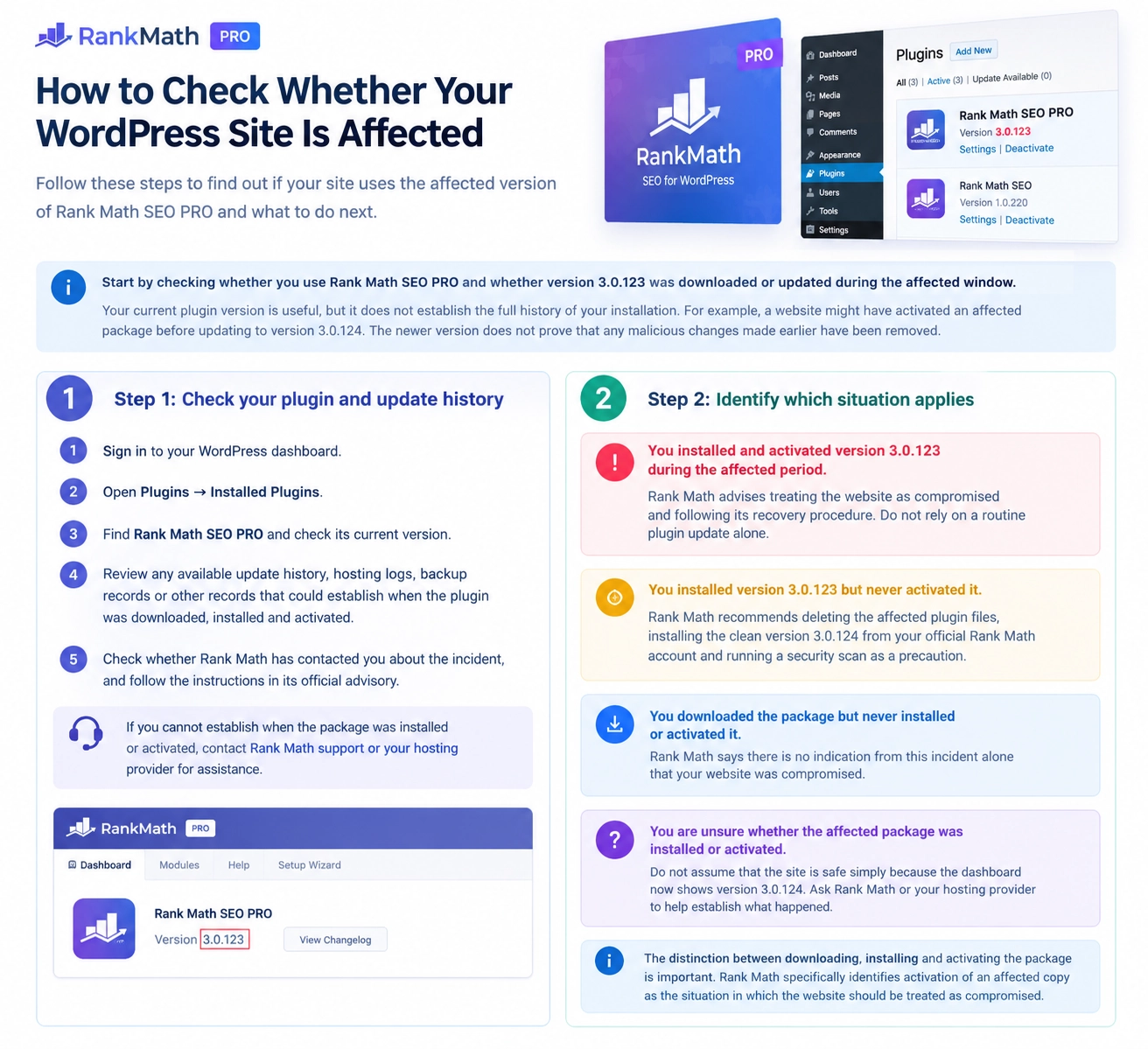
Step 1: Check your plugin and update history
- Sign in to your WordPress dashboard.
- Open Plugins → Installed Plugins.
- Find Rank Math SEO PRO and check its current version.
- Review any available update history, hosting logs, backup records or other records that could establish when the plugin was downloaded, installed and activated.
- Check whether Rank Math has contacted you about the incident, and follow the instructions in its official advisory.
If you cannot establish when the package was installed or activated, contact Rank Math support or your hosting provider for assistance.
Step 2: Identify which situation applies
You installed and activated version 3.0.123 during the affected period.
Rank Math advises treating the website as compromised and following its recovery procedure. Do not rely on a routine plugin update alone.
You installed version 3.0.123 but never activated it.
Rank Math recommends deleting the affected plugin files, installing the clean version 3.0.124 from your official Rank Math account and running a security scan as a precaution.
You downloaded the package but never installed or activated it.
Rank Math says there is no indication from this incident alone that your website was compromised.
You are unsure whether the affected package was installed or activated.
Do not assume that the site is safe simply because the dashboard now shows version 3.0.124. Ask Rank Math or your hosting provider to help establish what happened.
The distinction between downloading, installing and activating the package is important. Rank Math specifically identifies activation of an affected copy as the situation in which the website should be treated as compromised.
What could the malware do?
How a Compromised Plugin Can Create a Backdoor
A plugin can look legitimate but still contain malicious code. Here is how that code could put a WordPress website at risk.

A compromised plugin is installed
A website owner installs a plugin package that contains hidden malicious code.

The hidden code runs
When the affected plugin is activated, its malicious code may execute on the website.

A hidden way in may be created
The code could create a backdoor — a concealed way to access the website again.

An attacker may return
If the backdoor remains, an attacker could regain access even after the original plugin is removed.
Important: This diagram explains a possible attack path. It does not mean every website that installed the affected plugin was necessarily compromised. A suspected infection needs proper investigation and cleanup.
Illustration: how malicious code in a compromised WordPress plugin could lead to persistent access.
According to Rank Math and independent security reporting, the malware could establish persistent access to a website, create hidden backdoors and expose credentials or other secrets accessible to the website’s server.
A backdoor is a concealed way to regain access to a system. In this incident, the reported malware could recreate a hidden backdoor when someone visited an affected website. Removing one suspicious file might therefore be insufficient if the mechanism responsible for recreating it remains active.
Rank Math’s recovery guidance identifies several indicators that administrators should investigate, including:
- Unfamiliar PHP files in plugin, theme or other WordPress directories.
- Unexpected WordPress administrator accounts, including suspicious accounts with usernames beginning with
wpsupport_or email addresses ending in@wp-mail.net. - Suspicious entries in the WordPress database, including the option names
_uf6qdn2hmm,t8krdk990phband_np5pvf754c. - A file named
wp-includes/class-wp-cache-util.php, which Rank Math identifies as not being a legitimate WordPress core file. - Unexpected scheduled tasks, including a system cron entry marked
#ms6v46. - Suspicious
.cachefiles or unexpected changes to.htaccess. - Unusual changes to server settings, access credentials or files outside the WordPress installation.
These are indicators to investigate, not proof that every affected website contains every item on the list. Their absence also does not guarantee that a site is clean.
Avoid deleting unfamiliar files or database entries at random. Some legitimate plugins and hosting environments use files or settings that may look unusual. If you find a suspected indicator, follow the vendor’s recovery procedure or ask your hosting provider or a qualified security professional to investigate.
Sources: Rank Math’s recovery guide and BleepingComputer’s technical report.
Why a trusted plugin can become a security risk
This incident is an example of a software supply-chain compromise.
Website owners generally expect software downloaded from a developer’s official website to be genuine. A supply-chain compromise occurs when malicious code enters a software package or its distribution process, allowing users to receive a file that appears to come from a trusted source but contains code the developer did not intend to distribute.
Rank Math confirmed that some PRO packages contained malware. However, the public information reviewed for this article does not establish precisely how the malicious code entered the distribution process.
It would therefore be premature to blame a particular employee, account, server or development system without further evidence.
The practical lesson is that a trusted brand name cannot guarantee that every software package is safe. When a vendor confirms a distribution incident, users need to establish whether they received an affected package and follow the recommended recovery steps.
How to recover a website that activated the affected plugin
If your website activated an affected copy, Rank Math recommends restoring the website files and database from a clean backup created before the incident began.
The backup should predate 15 October 2026 at 20:02 UTC. A backup created after the affected package was activated may already contain malicious changes.
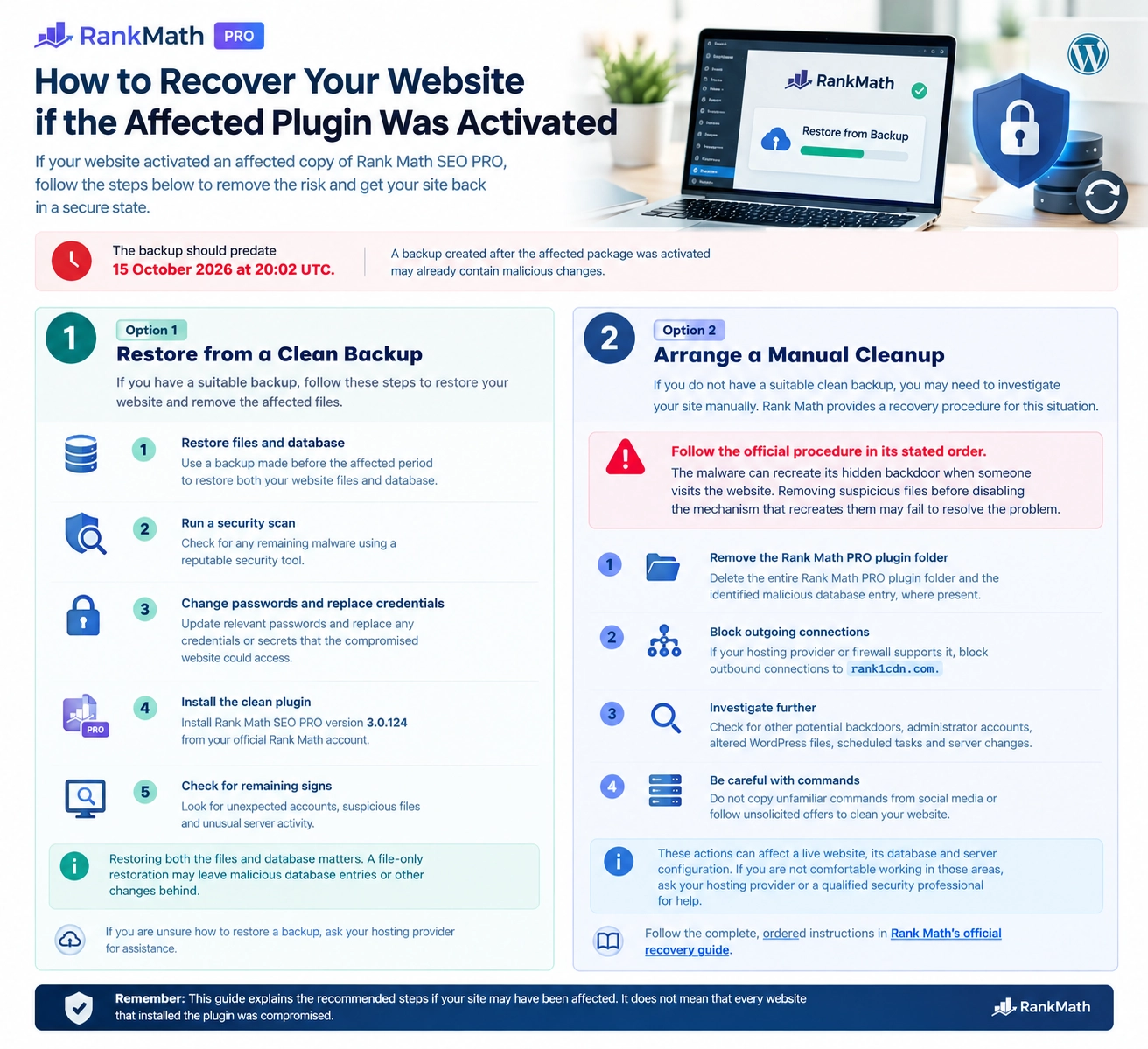
Option 1: Restore from a clean backup
If you have a suitable backup, Rank Math recommends the following steps:
- Restore the website files and database from a backup made before the affected period.
- Run a security scan using a reputable tool.
- Change relevant passwords and replace credentials or secrets that the compromised website could access.
- Install the clean Rank Math SEO PRO version 3.0.124 from your official Rank Math account.
- Check for remaining signs of unauthorised activity, including unexpected accounts, suspicious files and unusual server activity.
Restoring both the files and database matters. A file-only restoration may leave malicious database entries or other changes behind.
If you are unsure how to restore a backup, ask your hosting provider for assistance.
Option 2: Arrange a manual cleanup
If you do not have a suitable clean backup, the website may need a manual investigation. Rank Math provides a recovery procedure for this situation.
Follow the official procedure in its stated order. The vendor warns that the malware can recreate its hidden backdoor when someone visits the website. Removing suspicious files before disabling the mechanism that recreates them may therefore fail to resolve the problem.
The procedure begins by removing the entire Rank Math PRO plugin folder and the identified malicious database entry, where present. It also advises blocking outbound connections to rank1cdn.com if the hosting provider or firewall supports this.
The next steps involve investigating other potential backdoors, administrator accounts, altered WordPress files, scheduled tasks and changes to the server environment.
These actions can affect a live website, its database and server configuration. If you are not comfortable working in those areas, ask your hosting provider or a qualified security professional to carry out the recovery.
Do not copy unfamiliar commands from social media or follow unsolicited offers to clean your website.
Follow the complete, ordered instructions in Rank Math’s official recovery guide.
Why changing passwords and keys matters
Rank Math advises affected website owners to assume that credentials and secrets accessible to the compromised website may have been exposed. This precaution remains important even if the site is restored from a clean backup.
Depending on the website’s configuration, recovery may require replacing:
- WordPress administrator passwords and other relevant account passwords.
- Database credentials used by the website.
- WordPress security keys and salts.
- API keys, email service credentials and other secrets stored in website settings or configuration files.
- Hosting control-panel, FTP, SFTP or SSH credentials that may have been accessible.
- Credentials for connected services, such as payment or cloud services, where relevant.
After replacing credentials, update the website configuration and connected services that rely on them. Review administrator accounts and two-factor authentication settings as well.
Do not send passwords or API keys to someone who contacts you unexpectedly offering assistance. Use official Rank Math and hosting-provider support channels.
How to check that your website is clean
After recovery, run a security scan and check the integrity of WordPress core files. Rank Math also recommends checking plugin files where suitable checksums are available.
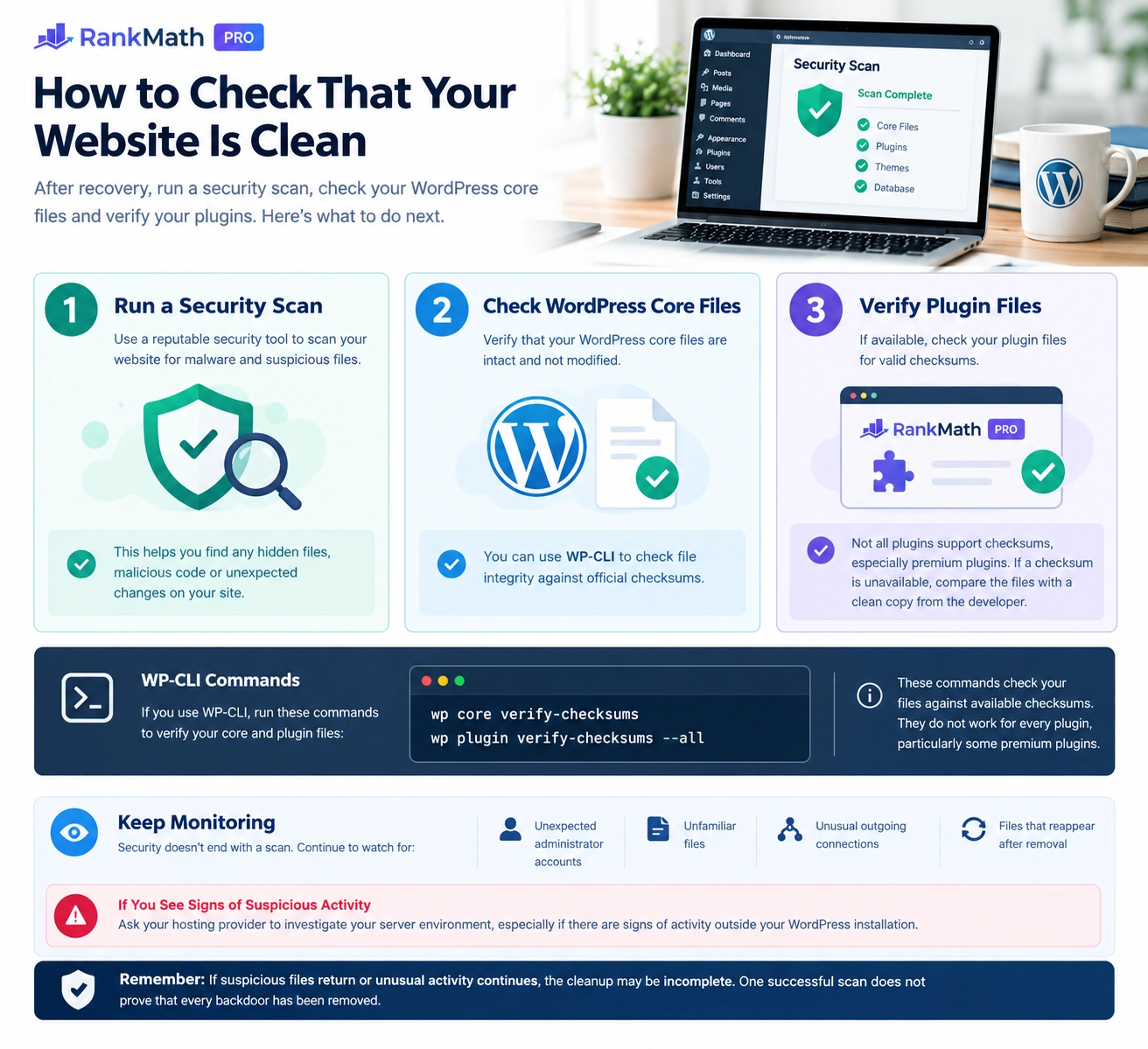
Administrators who use WP-CLI can run the following commands:
wp core verify-checksums
wp plugin verify-checksums --all
These commands check WordPress core and plugin files against available checksums. However, checksum verification is not available for every plugin, particularly some premium plugins. Where a suitable checksum is unavailable, compare the installed files with a clean copy obtained directly from the developer.
These checks are only one part of recovery. Continue monitoring for unexpected administrator accounts, unfamiliar files, unusual outgoing connections and files that reappear after removal.
Ask your hosting provider to investigate the server environment if you find signs of activity outside the WordPress installation.
If suspicious files return or unusual activity continues, the cleanup may be incomplete. One successful scan does not prove that every backdoor has been removed.
How to install the clean Rank Math PRO version
Once you have completed the applicable recovery steps, download version 3.0.124 directly from Rank Math.
Enter rankmath.com in your browser, sign in to your account and open the downloads area. Avoid unsolicited email links that claim to offer a replacement plugin or account recovery.
Installing version 3.0.124 gives you the clean replacement identified by Rank Math. It does not automatically remove malicious files, unauthorised accounts, scheduled tasks or other changes that may already have been created by an affected installation.
If your website activated an affected package, complete the recovery process before treating the site as safe.
What should WordPress website owners do now?
The first step is to establish whether your website received an affected Rank Math SEO PRO package during the documented period.
If you use only the free Rank Math SEO plugin, the company says this incident does not affect your installation. If you use PRO, check your version and available records, especially if you downloaded or updated version 3.0.123 on 15 or 16 October.
If an affected copy was activated, follow Rank Math’s recovery instructions, investigate the wider website and replace potentially exposed credentials. Updating the plugin alone is not enough to establish that the site is clean.
Regular backups, restricted administrator access and downloading software from official sources remain useful security practices. They cannot prevent every supply-chain compromise, but they can help website owners respond more effectively when one occurs.
Sources and Further Reading
Consult the original security advisory, vulnerability record, independent reporting and official release notes for further details.
Rank Math Security Incident
The vendor’s incident notice and recovery instructions for affected Rank Math SEO PRO installations.
Read the official recovery guideGitHub Advisory Database: CVE-2026-111862
The published security advisory describing the reported supply-chain compromise and its potential impact.
View the security advisoryBleepingComputer
Security news coverage of the Rank Math plugin compromise and the backdoors it could introduce.
Read the news reportRank Math Plugin Changelog
The official release history, including the published version details for Rank Math SEO PRO.
Check the plugin changelogEditorial note: These sources serve different purposes. The vendor advisory provides recovery guidance, the vulnerability database documents the reported security issue, independent reporting adds context, and the changelog records plugin releases.
Community discussion
Join the conversation
1 comment
Sign in to comment
Join the conversation with your Secritic account. Comments are available to signed-in readers.