
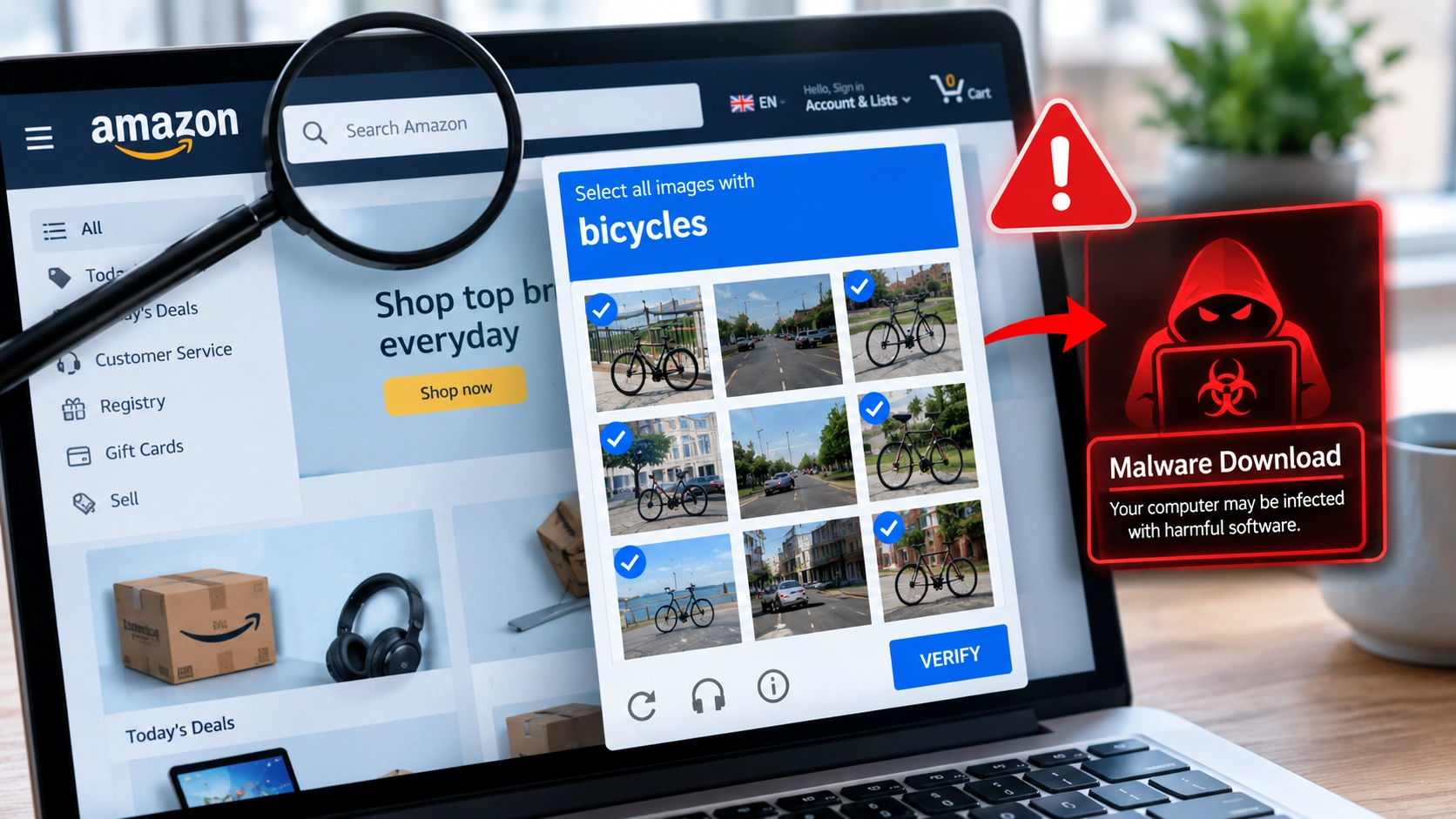
A sponsored search result, a fake Amazon login page and a simple “I’m not a robot” check were enough to start a sophisticated malware attack. Here’s how the scam works, what it can steal, and how to protect your computer.
Searching Google for a familiar brand can feel like a safe way to reach its website. But attackers can exploit that trust by placing malicious advertisements among search results and building fake pages that look convincing enough to fool ordinary users.
In a campaign investigated by cybersecurity company Huntress in October 2026, attackers used a sponsored search result for “amazon business” to direct users to a counterfeit Amazon login page. The page then presented a fake CAPTCHA that instructed victims to run a command on their computers.
That action started a chain of malicious activity involving information-stealing malware and an unauthorised remote-access tool. Huntress reported that the campaign had affected at least three of its customers.
The important warning is not that every Amazon search result is dangerous. It is that a familiar brand, a prominent advertisement and a routine-looking security check are not proof that a website is safe.
If a website asks you to open Windows Run, PowerShell or Command Prompt and paste a command to prove you are human, stop. A legitimate CAPTCHA does not require you to execute system commands.
Secritic · Threat Intelligence
How the Amazon Search Scam Works
From a sponsored search result to a potential malware infection.

Search
User searches for “amazon business.”
Sponsored adFake sign-in page
A deceptive website imitates Amazon.
Brand impersonationFake CAPTCHA
“Verification” prompts the user to take an unsafe action.
ClickFixCommand run
User is tricked into running a command in Windows.
Infection entry pointWindows finger.exe
A legitimate built-in utility is abused to start the reported chain.
More scripts and payloads
Additional stages lead to malware and remote-access software.
Lumma Stealer
Information-stealing malware reported in the investigation.
NetSupport Client
Remote-access software reported in a malicious context.
How the Amazon search scam begins
According to Huntress’s investigation, the attack began with a Google search for “amazon business.”
A sponsored result directed users to a deceptive web address that appeared to reference Amazon. The link then redirected visitors to a counterfeit Amazon sign-in page hosted through Google Sites.
The page asked visitors to enter an email address or phone number. After they submitted the information, a fake CAPTCHA appeared.
This sequence matters because each step made the next one seem more believable. Users had searched for a recognised business service, followed a prominent result, reached a page resembling a familiar login screen and encountered what appeared to be a normal security check.
But the CAPTCHA was not there to verify that the visitor was human.
Instead, clicking its verification button copied a command to the user’s clipboard and displayed instructions to open the Windows Run dialog and execute it.
The attack relied on the user following those instructions. It did not begin with a conventional software vulnerability that automatically infected every visitor who opened the page.
The fake CAPTCHA is the dangerous part
CAPTCHAs are commonly used to distinguish people from automated programs. They may ask visitors to identify pictures, type characters or complete another simple challenge.
The Amazon-themed campaign abused that familiar process to persuade people to perform an entirely different action: run a command on their own computers.
This technique is known as ClickFix. Rather than relying only on a malicious file download or an exploit, attackers present a supposed problem and guide the victim through instructions that execute malicious code.
The approach is not limited to this Amazon-themed campaign. The US Federal Trade Commission has also warned that fake CAPTCHA instructions can trick people into running commands that install malware.
The distinction is simple:
- A normal CAPTCHA asks you to complete a verification challenge on the webpage.
- A suspicious CAPTCHA may tell you to press Windows + R, paste text, open a terminal or run a command.
- A webpage cannot make those instructions safe merely by displaying a security logo or claiming that the process is required for verification.
Never paste and execute a command supplied by an unfamiliar webpage just to access a service. If a site says you must do this to sign in, verify your identity or unlock a page, leave it.
How a single command turned into a multi-stage attack
The most notable part of Huntress’s findings was what happened after the victim followed the fake CAPTCHA instructions.
1. A built-in Windows utility started the process
The command used Windows’ built-in finger.exe utility to contact attacker-controlled infrastructure and retrieve additional instructions.
The Finger protocol is an old internet technology that is rarely needed by ordinary Windows users. Its presence on a computer does not automatically indicate an infection. In this incident, however, attackers abused the utility as part of their malware delivery process.
Security researchers describe the misuse of legitimate system utilities in this way as living off the land. Instead of relying entirely on unfamiliar programs, attackers use tools that already exist on a system to carry out parts of an attack.
That can make suspicious activity harder to recognise, particularly when an organisation does not monitor how rarely used tools behave.
2. Additional scripts and malware were delivered
Huntress documented a chain involving remotely retrieved instructions, scripts, loaders and additional software components.
The process included IronPython, a legitimate Python implementation for the .NET environment, which was used in the attack chain. Huntress also described a downloaded archive being saved with a .pdf extension before being unpacked.
That detail illustrates why file extensions alone cannot establish whether a file is safe. A filename that looks like a document does not prove that its contents are a document.
The presence of a legitimate interpreter also does not mean the activity is legitimate. What matters is what code it is instructed to run, where that code came from and what the process does next.
3. Information-stealing malware and remote access tools appeared
Huntress traced the activity to multiple malicious components, including a sample identified as Lumma Stealer and an unauthorised deployment of NetSupport Client.
Lumma Stealer is an information-stealing malware family. Huntress’s analysis described activity targeting information associated with web browsers, password managers, cryptocurrency wallets and other applications.
If an information stealer successfully accesses sensitive data, the consequences may include stolen account credentials, exposed browsing information or compromised cryptocurrency wallets. The exact impact depends on the malware’s capabilities, the information available on the affected device and the attack’s success.
NetSupport Client is a legitimate remote monitoring and management tool. In this incident, researchers found a pirated copy deployed in a malicious context. Software designed for legitimate remote administration can become a threat when an unauthorised party installs or controls it.
These findings do not mean every person who saw the fake CAPTCHA had all these components installed. They describe the infection chain observed by Huntress during its investigation.
Read the technical analysis in Huntress’s original report.
Why this attack deserves attention
The incident highlights three risks that everyday users and businesses should understand.
First, sponsored placement is not a guarantee of safety. Advertising platforms have review and enforcement systems, but malicious advertisements can still slip through. Google removed the advertisement identified in Huntress’s investigation, yet the researchers reported that associated attacker infrastructure remained functional at the time of their analysis.
Second, familiar system tools can be misused. Seeing a built-in Windows utility or a legitimate software name does not establish that an operation is safe. The surrounding behaviour and source of the instructions matter.
Third, the victim may unknowingly start the infection. ClickFix attacks exploit people’s willingness to follow apparently helpful instructions. That does not make the victim responsible for the attack; it shows how attackers manipulate normal behaviour to bypass a person’s caution.
The findings also have implications for small businesses. A compromised employee computer may expose business email, saved credentials, customer information or access to other company systems, depending on the user’s permissions and the malware’s capabilities.
Huntress’s findings provide evidence of a specific campaign, not proof that every sponsored Amazon result is malicious or that every business is at risk from the same infrastructure.
How to recognise a fake Amazon search result
Before entering account information, take a moment to check where a search result leads.
Check the actual website address
A page can display Amazon’s name, colours and logo without being operated by Amazon.
Look carefully at the domain in the browser’s address bar. An address that contains the word “Amazon” somewhere is not necessarily an official Amazon website. Pay particular attention to the actual domain and its ending rather than the brand name embedded in a longer address.
When possible, open Amazon by typing its known official address yourself or using a trusted bookmark. For business services, navigate through Amazon’s official website rather than relying on an unexpected advertisement.
Treat unusual verification instructions as a warning
A request to open Windows Run, launch PowerShell, use Command Prompt or paste text into a terminal is a serious red flag when it comes from a webpage.
Do not follow the instructions simply because the page says they are required to complete a CAPTCHA.
Be cautious with unexpected sign-in requests
If you reached a sign-in page through an advertisement, check the address before entering your email, phone number or password. If anything looks unusual, close the page and navigate to the service independently.
Entering an email address or phone number does not, by itself, prove that your computer is infected. However, it may expose that information to the operator of a fraudulent page, depending on how the page is built.
What to do if you already followed the fake CAPTCHA instructions
If you pasted a command into Windows Run or a terminal and executed it, treat the situation as a potential security incident. Do not assume that closing the browser or deleting the page has removed anything that may have been installed.
SECURITY RESPONSE
Treat the computer as potentially compromised until it has been assessed. Follow the response path below.
Contain the risk
Disconnect the suspected device from the network. Do not use it for sensitive accounts.
Contact IT or security
Follow the organisation’s incident-response process before making changes or running cleanup tools.
Investigate safely
Use a reputable, up-to-date security tool. A clean scan does not guarantee the device is safe.
Protect your accounts
From a different, trusted device, change important passwords, review active sessions and enable multifactor authentication.
Look for signs of misuse
Check recent sign-ins, security alerts, email forwarding rules and unexpected account changes.
Escalate promptly
Contact your security team, bank or affected service as appropriate. Preserve evidence if an investigation is needed.
Continue monitoring
Keep checking accounts and follow trusted security guidance. No visible signs do not prove there was no compromise.
1. Stop using the affected computer for sensitive activity
If you suspect malware is running, disconnect the device from Wi-Fi or its wired network connection to reduce the opportunity for further remote communication. Avoid using that computer to access banking, email, password managers or other sensitive accounts while you assess the incident.
For a work computer, contact your IT or security team immediately and follow its incident-response instructions.
2. Use a trusted security tool to investigate
Run a security scan with a reputable, up-to-date security product. If the device is managed by an employer, let the security team investigate before making changes that could destroy useful evidence.
A scan is a sensible step, but a clean result does not always prove that no compromise occurred.
3. Secure your important accounts from a different device
If an information stealer may have run, use a separate device you trust to change the passwords for important accounts, starting with your primary email and accounts that can reset other passwords.
Review active sessions, sign out unfamiliar devices where the service permits it, and enable multifactor authentication. If you use a password manager, follow the provider’s advice for handling a potentially compromised device.
If you suspect that financial information or cryptocurrency wallet credentials were exposed, contact the relevant financial institution or service promptly.
4. Check for suspicious account activity
Review recent sign-ins, security notifications, email forwarding rules and unfamiliar changes to account settings. For business accounts, administrators should also review authentication logs and other available endpoint and network evidence.
Do not assume that changing one password resolves every possible consequence of an infection. A compromised device may have exposed more than one account, and remote-access malware can create risks beyond stolen passwords.
For additional consumer guidance, see the FTC’s advice on fake CAPTCHA scams.
What small businesses and IT administrators should do
The campaign also offers practical lessons for organisations that manage Windows computers.
- Train staff to recognise ClickFix instructions. Employees should know that a website asking them to execute a command is not a normal CAPTCHA.
- Monitor unusual system behaviour. Security teams should investigate unexpected use of
finger.exe, unapproved script execution and unusual outbound connections. - Restrict unnecessary tools where practical. Administrators can assess whether users need access to Windows Run or particular utilities, while avoiding restrictions that disrupt legitimate work.
- Review endpoint and network telemetry. Investigators may be able to identify unusual command execution, connections to unfamiliar infrastructure and unexpected software running from directories such as
C:\ProgramData. - Maintain a response plan. Staff should know whom to contact if they have run a suspicious command, and administrators should know how to isolate a device and preserve relevant evidence.
Huntress’s report discusses the use of the Finger protocol over TCP port 79 and NetSupport traffic using TCP port 725 in the investigated chain. These are useful technical leads for defenders, not universal indicators of compromise. Administrators should investigate them in context rather than assuming that all traffic on an uncommon port is malicious.
Organisations can also consult Microsoft’s analysis of ClickFix for further information about the technique and its detection.
The bigger lesson: do not let a webpage operate your computer
The Amazon-themed campaign demonstrates how a simple search can lead to a much more serious problem. A sponsored result created the initial opportunity, a counterfeit login page established trust, and a fake CAPTCHA persuaded users to execute a command that started a complex infection chain.
The most effective everyday precaution is also the simplest: do not run commands supplied by a webpage to prove that you are human.
Use known official addresses for important services, examine suspicious sign-in pages carefully, and treat unexpected instructions to open system tools as a warning. For businesses, combine user awareness with endpoint monitoring and a clear incident-response process.
The malicious advertisement identified in this investigation was reportedly removed, but that does not mean similar scams have disappeared. The technique can be reused with different brands, search terms and malware.
A CAPTCHA should verify a visitor, not ask them to hand control of their computer to an unknown party.
Sources and further reading
Research and guidance used to explain the campaign and its risks.
-
Huntress
Primary technical investigation of the Amazon-themed ClickFix campaign.
Read the investigation -
Dark Reading
Reporting on the abuse of a longstanding Windows utility in the attack.
Read the report -
Federal Trade Commission
Consumer guidance on recognising fake CAPTCHA instructions.
Read the consumer advice -
Microsoft Security
Technical background on ClickFix social engineering and defensive measures.
Read Microsoft’s analysis
Reporting note: Campaign-specific findings are attributed to the named sources. This article does not suggest that every Amazon advertisement is malicious, that every visitor was infected, or that the campaign remains active in its originally observed form.


Community discussion
Join the conversation
0 comments
Be the first to join in
There are no comments yet. Sign in to start a thoughtful discussion.
Sign in to comment
Join the conversation with your Secritic account. Comments are available to signed-in readers.